Typora supports rendering normal mathematics using Tex/LaTeX syntax. The rendering process is processed by MathJax.
Table of Contents
- Math Block (Display Math)
- Inline Math
- TeX Commands available in Typora
- Physics Package
- Chemistry Expressions
- Cross Reference
- Auto Numbering
- Troubleshooting
- Limitations
Math Block (Display Math)
Math blocks are LaTeX expressions wrapped by $$ mark and line break, for example:
$$
\begin{align*}
y = y(x,t) &= A e^{i\theta} \\
&= A (\cos \theta + i \sin \theta) \\
&= A (\cos(kx - \omega t) + i \sin(kx - \omega t)) \\
&= A\cos(kx - \omega t) + i A\sin(kx - \omega t)  \\
&= A\cos \Big(\frac{2\pi}{\lambda}x - \frac{2\pi v}{\lambda} t \Big) + i A\sin \Big(\frac{2\pi}{\lambda}x - \frac{2\pi v}{\lambda} t \Big)  \\
&= A\cos \frac{2\pi}{\lambda} (x - v t) + i A\sin \frac{2\pi}{\lambda} (x - v t)
\end{align*}
$$
will be rendered as
\[\begin{align*} y = y(x,t) &= A e^{i\theta} \\ &= A (\cos \theta + i \sin \theta) \\ &= A (\cos(kx - \omega t) + i \sin(kx - \omega t)) \\ &= A\cos(kx - \omega t) + i A\sin(kx - \omega t) \\ &= A\cos \Big(\frac{2\pi}{\lambda}x - \frac{2\pi v}{\lambda} t \Big) + i A\sin \Big(\frac{2\pi}{\lambda}x - \frac{2\pi v}{\lambda} t \Big) \\ &= A\cos \frac{2\pi}{\lambda} (x - v t) + i A\sin \frac{2\pi}{\lambda} (x - v t) \end{align*}\]In Typora, you can just type $$ and press the Return key to input a math block. In input mode, use the Up/Down arrow keys or Command/Ctrl + Return key to finish editing, or just click the ✓ button, or somewhere else.
Inline Math
First of all, please enable theInline Math feature from the preferences panel -> Markdown section. The preferences panel can be opened from menu bar → File → Preferences..., or use shortcut key Command/Ctrl + ,. This setting will be applied after Typora restarts.
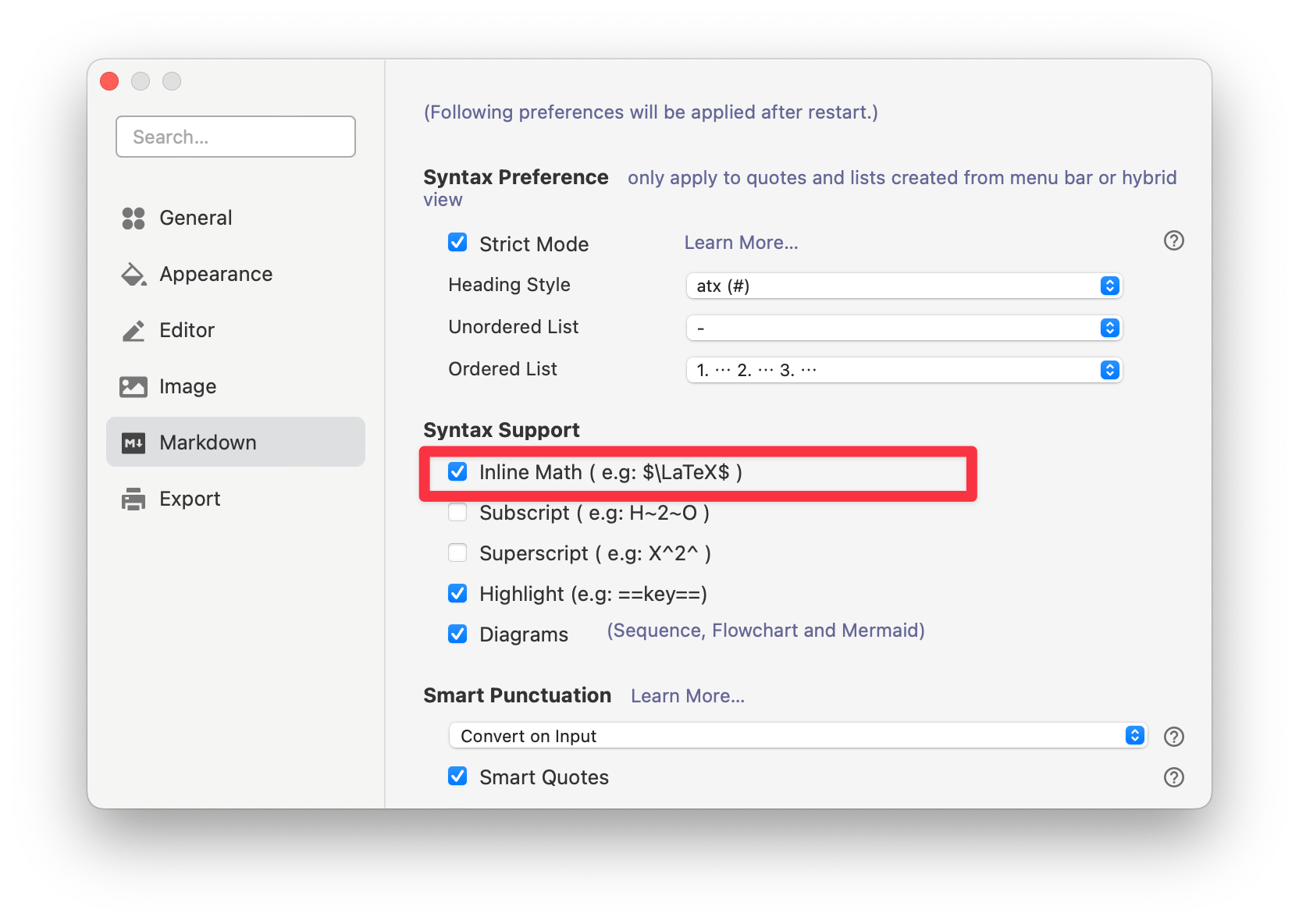
Inline math uses syntax like this $<Math Expressions>$, e.g: $f = \frac{2 \pi}{T}$.
Inline math compatible mode {: #inline-math-compatible-mode }
By default, Typora recognizes $…$ inline math with rules close to Pandoc: the opening $ must not be followed by spaces or tabs; the closing $ must not be preceded by spaces or tabs (and the last character before $ must not be a backslash); and the closing $ must not be immediately followed by a digit (so currency like $2 stays text).
If you turn on Use legacy inline math parsing (compatible mode) in Preferences → Markdown → Math, Typora uses the older delimiter rule instead: a pair of $ characters forms inline math when the character just before the closing $ is not a backslash (the rule Typora used before inline math parsing was aligned with Pandoc-style rules). That accepts some spans that the Pandoc-style rule treats as plain text (for example when spaces appear next to a delimiter, or when a closing $ is followed by a digit). Enable this only when you need documents parsed the way older Typora versions did.
TeX Commands available in Typora
You can find all the supported TeX commands at http://docs.mathjax.org/en/latest/input/tex/macros/index.html.
You can add new commands using the \def or\newcommand. For example:
$$
\def\bold#1

\bold{this\ is\ now\ bold}
$$
Physics Package
To use the Physics package, please enable it in Preference Panel → Markdown → Math → Enable physics package .
Chemistry Expressions
Typora has the built-in mhchem extension, which can be used to render Chemistry Expressions, you could use it like this:
$\ce{CH4 + 2 $\left( \ce{O2 + 79/21 N2} \right)$}$
Which will be rendered as: 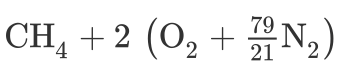
For more details, please refer to https://mhchem.github.io/MathJax-mhchem/.
Cross Reference
Typora supports the TeX-style reference syntax, for example:
Here is a labeled equation:

$$
x+1\over\sqrt{1-x^2}\label{ref1}\tag{1}
$$

This is a reference : $\ref{ref1}$
Auto Numbering
Typora supports auto-numbering math blocks.
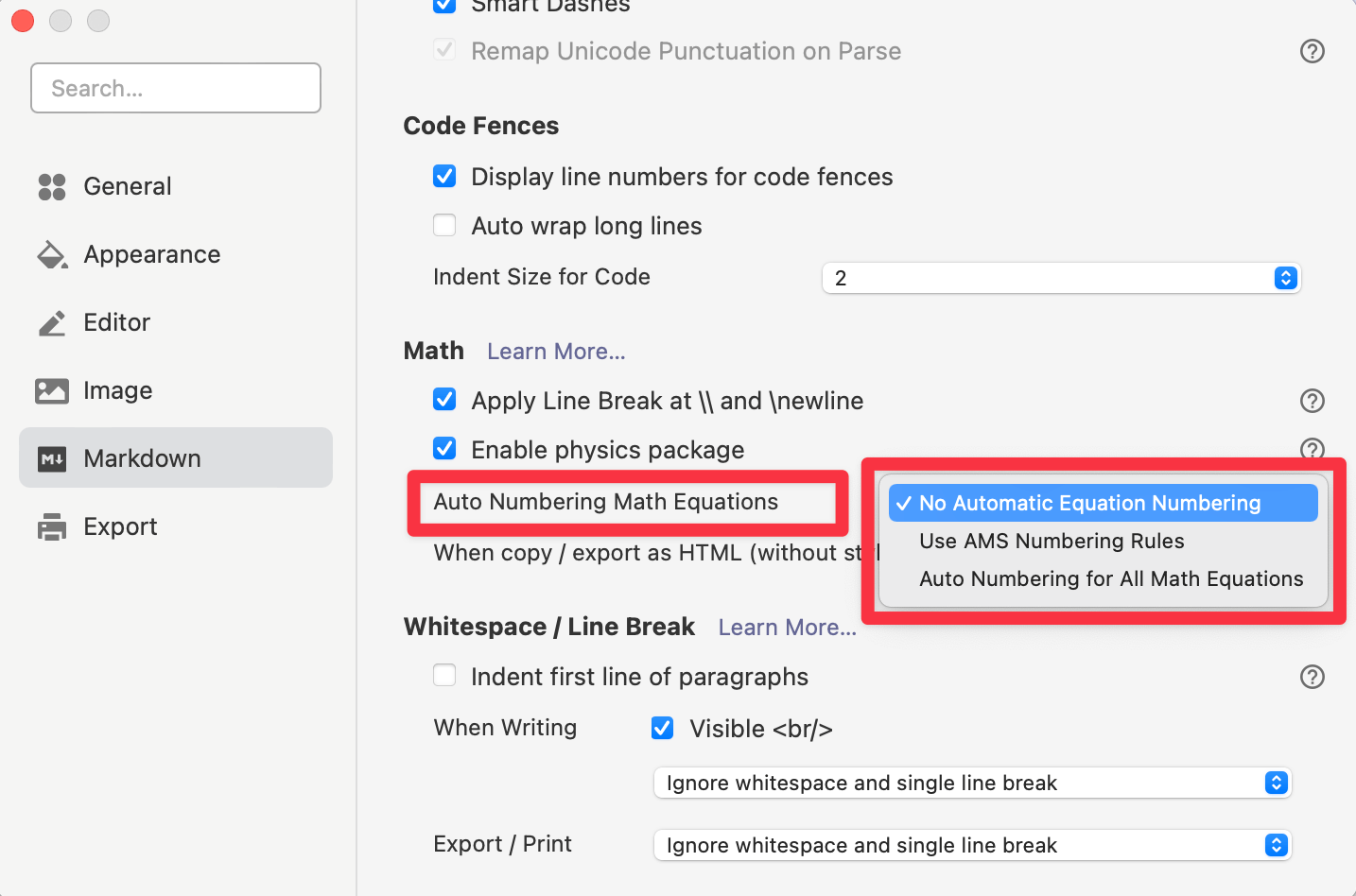
To turn on this feature, please open the preferences panel and enable “Auto Numbering Math Equations” under the “Markdown” section.
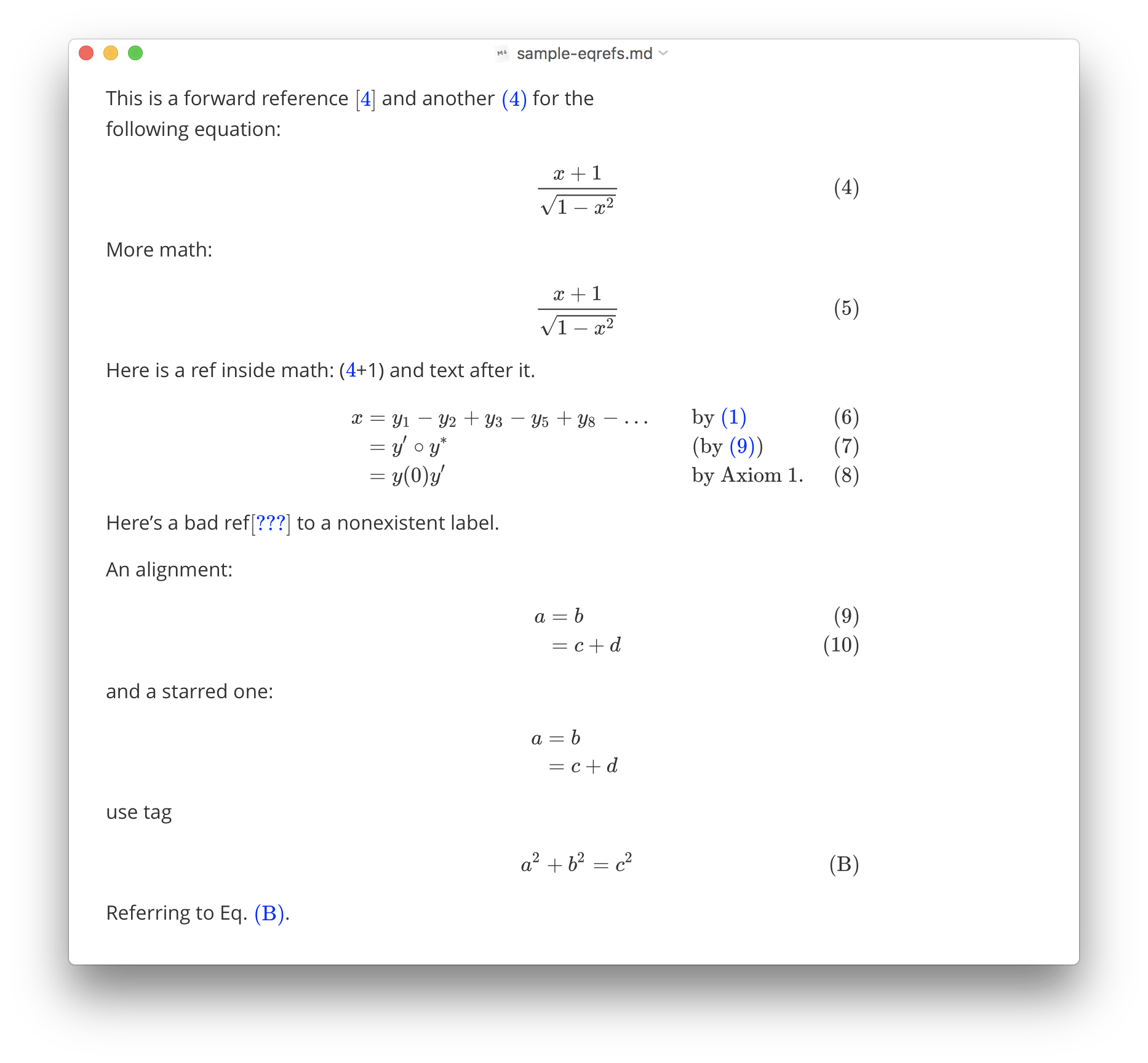
You can choose:
- No Automatic Equation Number (but you can manually number equations with
\tagand\label). - Use AMS Numbering Rule (where only certain environments produce numbered equations, as they would be in LaTeX).
- Auto Numbering for All Math Equations (every displayed equation will get a number, regardless of the environment used).
Troubleshooting
Force Refresh
When math rendering goes wrong, like the output math is too wild/narrow, or equation numbering becomes incorrect, you can trigger a forced refresh for all math from the Edit → Math Tools menu.
Line Breaking
Starting from v0.11.0, Typora upgraded to MathJax v3, which does not support line break using \\ or \newline in MathJax v2, the behavior is the same with LaTeX, unless you put them in a \displaylines{} environment, for example:
\displaylines{x+y\\y+z}
So you could use \displaylines as a workaround.
From v0.11.1, Typora provides a new option “Apply Line Break at \\” under Preferences Panel → Markdown → Math. By enabling it, Typora will auto wrap your math content with \displaylines if your content contains \\ or \newline to achieve the same behavior as previous versions. But it may bring some unexpected issues, so if you are met with any math issues after enabling it, please try disabling the option and report to us if it is the cause.
Use \displaylines instead of enabling “Apply Line Break at \\” is recommended for adding line breaks in math.
Limitations
- MathJax supports a limited subset of all LaTeX commands (references: http://docs.mathjax.org/en/latest/input/tex/macros/index.html).
- Not all export formats support math, and some commands/features of math/LaTeX would become unavailable after export.